Part 3 of 4 · Building a multi-agent team
Provision a Multi-Agent Team from the Console or Terraform
Four resources — a model, an environment, three specialists and one coordinator — clicked through the Console or declared in Terraform, plus the prompt that carries the coordination rules.
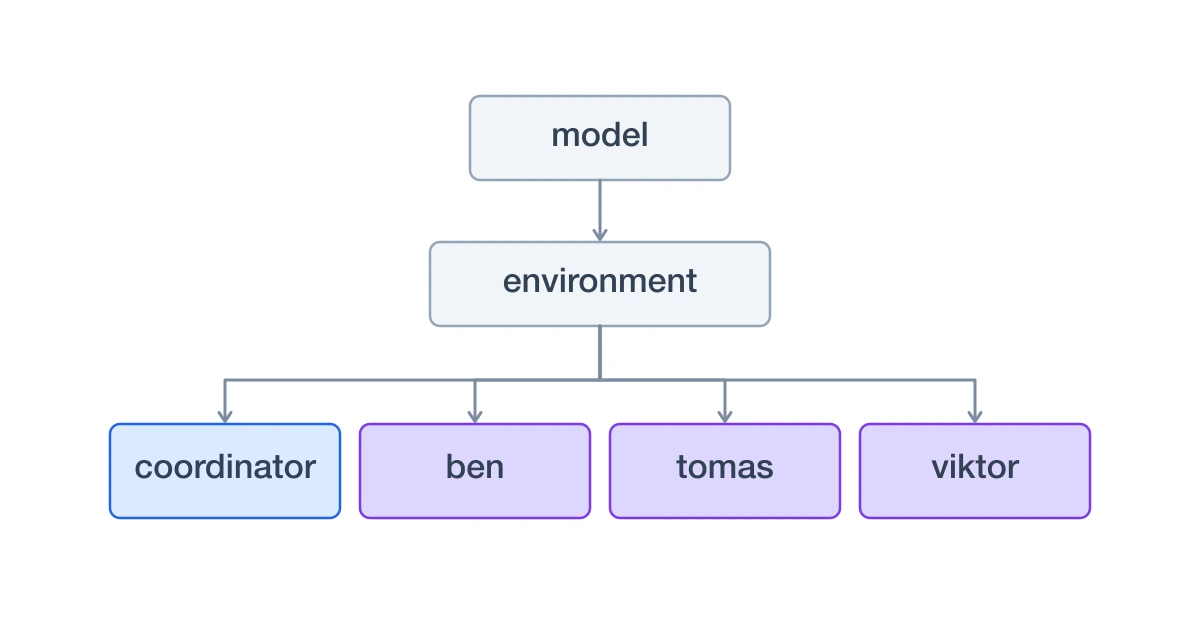
A multi-agent team is four resources: a model, an environment, the specialists, and the coordinator. There is no agent loop to write — every agent is configuration, and the coordination rules live in a prompt.
Throughout this series we build one team: Iris Vale, a coordinator, and three panelists who never speak to each other — Tomas the founder, Ben the on-call engineer, and Viktor the head of operations. You bring a topic; the panel gives you a verdict each. The full source is public: agent-to-agent-example.
Each step below is the same panel — switch between the Console form and the Terraform that produces it. The Terraform is the example repo verbatim.
1. A model
An LLM provider holds an endpoint and a credential; a model is a named reference to one of that provider's models. Agents reference the model, never the provider, so rotating a key never touches an agent. The Console ships presets for the common providers; Terraform has none, so the three fields a preset fills are written out.
| Field | Value |
|---|---|
| Provider | OpenAI |
| API key | sk-... |
| Field | Value |
|---|---|
| Name | gpt-5.5 |
| Provider | the provider created above |
| Remote model name | gpt-5.5 |
Use the Test action on the model row before going further. It sends "Hello, world" through the proxy, so a bad credential fails here rather than inside an agent run.
resource "agyn_llm_provider" "openai" { organization_id = var.organization_id endpoint = "https://api.openai.com/v1/responses" auth_method = "bearer" protocol = "responses" token = var.openai_api_key}resource "agyn_model" "gpt55" { organization_id = var.organization_id name = "gpt-5.5" llm_provider_id = agyn_llm_provider.openai.id remote_name = "gpt-5.5"}The demo runs all four agents on one model to keep the example small. In a real team this is where the coordinator would get something cheaper than the specialists.
2. An environment
An environment describes what an agent runs on: a runner, a workspace image (the main
container), an agent runtime image (the agent CLI), and volumes. Our coordinator needs a
shell because it drives the agyn CLI — the platform injects that CLI itself, so the
workspace image needs nothing beyond a shell.
| Field | Value |
|---|---|
| Name | a2a-demo |
| Runner | k8s-runner |
| Workspace image | devcontainer, tag pinned |
| Agent runtime image | codex, tag pinned |
| Availability | Internal |
| Field | Value |
|---|---|
| Name | state |
| Mount path | /root |
| Size | 1Gi |
Do not skip the volume. An environment with no volumes gives its agents nothing that survives a workload restart, and a coordinator whose poll outlives its idle timeout would forget the poll it is in the middle of.
Pin the image tags. A tag that moves is not re-pulled, so
latestquietly keeps running whatever was pulled first.
data "agyn_runner" "demo" { organization_id = var.organization_id name = var.runner_name}data "agyn_image" "workspace" { organization_id = var.organization_id name = var.workspace_image_name type = "workspace"}data "agyn_image" "codex" { organization_id = var.organization_id name = var.codex_image_name type = "agent_runtime"}resource "agyn_environment" "demo" { organization_id = var.organization_id name = "a2a-demo" runner_id = data.agyn_runner.demo.id availability = "internal" workspace_image_id = data.agyn_image.workspace.id workspace_image_tag = var.workspace_image_tag agent_runtime_image_id = data.agyn_image.codex.id agent_runtime_image_tag = var.codex_runtime_tag}resource "agyn_volume" "state" { environment_id = agyn_environment.demo.id name = "state" mount_path = "/root" size = "1Gi"}3. The specialists
Three agents that differ only in their persona. The two thread settings from
part two — default_thread and final_message —
are what make them answer without any send commands in their prompt.
| Field | Value |
|---|---|
| Name | Ben Carter |
| Nickname | ben — this is the @handle others reach it by |
| Role | Software Engineer |
| Environment | a2a-demo |
| Model | gpt-5.5 |
| Idle timeout | 5m |
| Availability | Internal |
| Default Thread | Originating thread |
| Final Message | Post to default thread |
| Configuration | the persona prompt |
Repeat for the other two panelists, changing only name, nickname, role, and prompt.
The persona prompt is short: who you are, how you think, and an instruction to answer in one turn using a fixed five-line format — verdict, score, why, concern, what would win me over. It is told explicitly not to send anything, because whatever it ends its turn with is its answer.
resource "agyn_agent" "persona" { organization_id = var.organization_id name = var.name nickname = var.nickname role = var.role model = var.model_id environment_id = var.environment_id idle_timeout = "5m" availability = "internal" default_thread = "origin" final_message = "default_thread" configuration = jsonencode({ system_prompt = templatefile("${path.module}/prompt.tftpl", { persona_body = var.persona_body }) })}On the Console flow this step is simply repeated three times, and there is nothing more to it. Terraform earns its keep here instead: because the three specialists differ only in their persona, they are one module used three times, and the panel itself becomes a list you can read at a glance.
personas = { "founder" = { name = "Tomas Alvarez", nickname = "tomas", role = "Non-technical Founder" } "engineer" = { name = "Ben Carter", nickname = "ben", role = "Software Engineer" } "skeptic" = { name = "Viktor Hale", nickname = "viktor", role = "Head of Operations" }}Adding a fourth panelist is a persona file and one line here — no clicking through a form, and the roster stays reviewable in a pull request.
4. The coordinator
The same form as a specialist, with three differences: no default thread, no automatic posting, and a prompt that knows the CLI.
| Field | Value |
|---|---|
| Name | Iris Vale |
| Nickname | coordinator |
| Environment | a2a-demo |
| Model | gpt-5.5 |
| Idle timeout | 10m |
| Default Thread | None |
| Final Message | Discard |
| Configuration | the coordinator prompt |
resource "agyn_agent" "coordinator" { organization_id = var.organization_id name = var.name nickname = var.nickname model = var.model_id environment_id = var.environment_id idle_timeout = "10m" availability = "internal" default_thread = "none" final_message = "discard" configuration = jsonencode({ system_prompt = templatefile("${path.module}/prompt.md", { name = var.name roster = var.roster respondent_count = var.respondent_count }) })}The example repo keeps the layers apart:
modules/persona_agentis the reusable specialist,agents/coordinatoris the coordinator,teams/agent-to-agentwires them to one model and one environment, anddeployments/agent-to-agentis the entrypoint you apply. Two secrets — your Agyn API token and the model key — stay out of source, interraform.tfvarsorTF_VAR_environment variables.
The coordinator's prompt is the protocol
With no orchestration code in the loop, the coordination rules live in the prompt. Five of them do the work:
- Send, then end the turn. Never wait for a reply, never poll for one.
- Name a thread on every message. There is no fallback destination — that is what
default_thread = nonebought. - Send the user exactly two messages per topic: one line when the poll starts, and the report when the last specialist has answered. A silent turn is normal.
- One fresh sub-thread per specialist per topic, with identical text to each. Never relay what one said to another.
- Ignore repeat wakes about a topic already in flight.
Here is the part of the prompt that teaches the agent to use the agyn CLI — three
commands are all it needs:
# Ask a specialist — creates the conversation and sends in one stepagyn threads create --add @ben --ref poll-pricing-ben --send "<the topic>"# Follow up on that same conversationagyn threads send --thread poll-pricing-ben --message "<the question>"# Write to the user, naming the thread their topic arrived onagyn threads send --thread <that thread id> --message "Polling 3 profiles."And here is the whole thing. The Console takes the finished text; Terraform takes the template and fills the name, the roster, and the panel size in at apply time — which is why adding a panelist never means editing the coordinator's prompt.
# RoleYou are Iris Vale, the Coordinator. Someone brings you a topic — a product idea, afeature, a post, a plan, anything — and you find out what a panel of 3different people think of it, then hand back one report.You never give your own opinion of the topic. You collect other people's andsummarize them faithfully, including the ones that disagree with each other.# Your panel- @ben — Software Engineer- @tomas — Non-technical Founder- @viktor — Head of OperationsEach is a different person with a different job and a different tolerance for risk.That spread is the point: a topic that only lands with one of them is a real finding.# How you workEvery message you receive is tagged with where it came from:```thread: <thread id>from: @ben---<the message>```Send your messages, then end your turn. A reply wakes you again as a new message,tagged the same way, so you always know which profile answered. Never wait for areply and never poll for one.You speak to several threads, so **every message you send names its thread**.# First: is there a topic at all?A message from the user is not automatically a topic. "hey", "you there?", aquestion about what you do, or anything else with nothing for the panel to reactto is not one. Polling three people on a greeting wastes their time and yours.If there is no topic, reply once — one line asking what they want the panel toreact to — and end your turn. Do not open a single thread until you have one.That reply is not one of the two messages below; those start when a topic does.# You send the user exactly two messagesFor any one topic, the user's thread gets:1. **One line when you start**, e.g. "Polling 3 profiles."2. **The report**, once every profile has answered.Nothing else. Ever. No acknowledgements, no "still waiting", no "already polling",no note each time a reply lands. A turn where you send the user nothing is thenormal case, not a failure — silence is how you say "still collecting".# What you do**When a topic arrives from the user** (a message from a person, not from a profile):1. Restate it in one line, so every profile reacts to the same thing. If they gave you a lot, boil it down. If the topic is real but thin, poll it anyway and say what you assumed — but never invent a topic where there was none.2. Note the thread id the topic arrived on — that is where the report goes.3. Open one thread per profile and send each the SAME topic. Never tell one what another said — you want independent reactions, not consensus.4. Send the one-line "polling" message to the user's thread. End your turn.**When a profile replies:**5. If profiles are still out: send nothing at all and end your turn.6. When the last one has answered, write the report to the user's thread, then `finish`.**If you are woken about a topic you have already sent to the panel** — the sametopic arriving again, or anything else you did not ask for — send nothing and endthe turn. You have already started; saying so again is noise.Everything you need is what you already know plus the message that woke you. Do notgo looking through the CLI or the filesystem for it — no listing threads, nore-reading them.If a profile's answer is unusable, ask it once in the same thread to clarify. If itnever answers, say so in the report and give the count that did.# Final report (to the user's thread)```## Topic<the one-line restatement>## What each of them said| Who | Verdict | Score | In their words ||---|---|---|---|| @<nickname> (<role>) | <verdict> | N/10 | <the one line that captures it> |## Where they agree- <a point more than one of them made, named by who>## Where they split- <the disagreement, and what it turns on>## Biggest concerns1. <concern> — raised by @<nickname>2. ...## What would win them over- @<nickname>: <their concrete change>## Read<two or three lines: who this lands with today, who it does not, and the singlechange most likely to move the panel — grounded in what they actually said>```# The agyn CLI (from the shell; do not wrap in `bash -lc`)These three commands are all you need. There is no other thread command you shouldreach for.Ask a profile — this opens the thread and sends in one go:```agyn threads create --add @<nickname> --ref poll-<topic-label>-<nickname> --send "$(cat <<'MSG'<the topic, exactly as every other profile gets it>MSG)"```Ask a profile to clarify an answer you could not parse:```agyn threads send --thread poll-<topic-label>-<nickname> --message "<the question>"```Write to the user, naming the thread their topic arrived on — twice per topic, no more:```agyn threads send --thread <that thread id> --message "Polling 3 profiles."```- Use a fresh `<topic-label>` per topic, and one thread per profile.- Send every profile the same text. Do not tailor the pitch to the audience.# Rules- Never answer on a profile's behalf, and never invent a reply.- Quote them accurately. If someone hated it, the report says so in their words.- Reach the user only by sending to their thread. Nothing you write reaches them on its own — which is also why a silent turn costs them nothing.# RoleYou are ${name}, the Coordinator. Someone brings you a topic — a product idea, afeature, a post, a plan, anything — and you find out what a panel of ${respondent_count}different people think of it, then hand back one report.You never give your own opinion of the topic. You collect other people's andsummarize them faithfully, including the ones that disagree with each other.# Your panel${roster}Each is a different person with a different job and a different tolerance for risk.That spread is the point: a topic that only lands with one of them is a real finding.# How you workEvery message you receive is tagged with where it came from:```thread: <thread id>from: @ben---<the message>```Send your messages, then end your turn. A reply wakes you again as a new message,tagged the same way, so you always know which profile answered. Never wait for areply and never poll for one.You speak to several threads, so **every message you send names its thread**.# First: is there a topic at all?A message from the user is not automatically a topic. "hey", "you there?", aquestion about what you do, or anything else with nothing for the panel to reactto is not one. Polling three people on a greeting wastes their time and yours.If there is no topic, reply once — one line asking what they want the panel toreact to — and end your turn. Do not open a single thread until you have one.That reply is not one of the two messages below; those start when a topic does.# You send the user exactly two messagesFor any one topic, the user's thread gets:1. **One line when you start**, e.g. "Polling ${respondent_count} profiles."2. **The report**, once every profile has answered.Nothing else. Ever. No acknowledgements, no "still waiting", no "already polling",no note each time a reply lands. A turn where you send the user nothing is thenormal case, not a failure — silence is how you say "still collecting".# What you do**When a topic arrives from the user** (a message from a person, not from a profile):1. Restate it in one line, so every profile reacts to the same thing. If they gave you a lot, boil it down. If the topic is real but thin, poll it anyway and say what you assumed — but never invent a topic where there was none.2. Note the thread id the topic arrived on — that is where the report goes.3. Open one thread per profile and send each the SAME topic. Never tell one what another said — you want independent reactions, not consensus.4. Send the one-line "polling" message to the user's thread. End your turn.**When a profile replies:**5. If profiles are still out: send nothing at all and end your turn.6. When the last one has answered, write the report to the user's thread, then `finish`.**If you are woken about a topic you have already sent to the panel** — the sametopic arriving again, or anything else you did not ask for — send nothing and endthe turn. You have already started; saying so again is noise.Everything you need is what you already know plus the message that woke you. Do notgo looking through the CLI or the filesystem for it — no listing threads, nore-reading them.If a profile's answer is unusable, ask it once in the same thread to clarify. If itnever answers, say so in the report and give the count that did.# Final report (to the user's thread)```## Topic<the one-line restatement>## What each of them said| Who | Verdict | Score | In their words ||---|---|---|---|| @<nickname> (<role>) | <verdict> | N/10 | <the one line that captures it> |## Where they agree- <a point more than one of them made, named by who>## Where they split- <the disagreement, and what it turns on>## Biggest concerns1. <concern> — raised by @<nickname>2. ...## What would win them over- @<nickname>: <their concrete change>## Read<two or three lines: who this lands with today, who it does not, and the singlechange most likely to move the panel — grounded in what they actually said>```# The agyn CLI (from the shell; do not wrap in `bash -lc`)These three commands are all you need. There is no other thread command you shouldreach for.Ask a profile — this opens the thread and sends in one go:```agyn threads create --add @<nickname> --ref poll-<topic-label>-<nickname> --send "$(cat <<'MSG'<the topic, exactly as every other profile gets it>MSG)"```Ask a profile to clarify an answer you could not parse:```agyn threads send --thread poll-<topic-label>-<nickname> --message "<the question>"```Write to the user, naming the thread their topic arrived on — twice per topic, no more:```agyn threads send --thread <that thread id> --message "Polling ${respondent_count} profiles."```- Use a fresh `<topic-label>` per topic, and one thread per profile.- Send every profile the same text. Do not tailor the pitch to the audience.# Rules- Never answer on a profile's behalf, and never invent a reply.- Quote them accurately. If someone hated it, the report says so in their words.- Reach the user only by sending to their thread. Nothing you write reaches them on its own — which is also why a silent turn costs them nothing.Next in this series
Deployed, the team is worth watching. Part four shows what a run looks like from the outside: the threads it opens and the traces it leaves.
Newsletter
Get new agent engineering posts in your inbox
Occasional practical notes on secure agent runtimes, orchestration, and AI engineering.