Part 4 of 4 · Building a multi-agent team
What a Multi-Agent Run Looks Like: Threads and Traces
One topic, four threads and ten trace events — reading a multi-agent run from the outside, and the three failure shapes worth knowing how to diagnose.
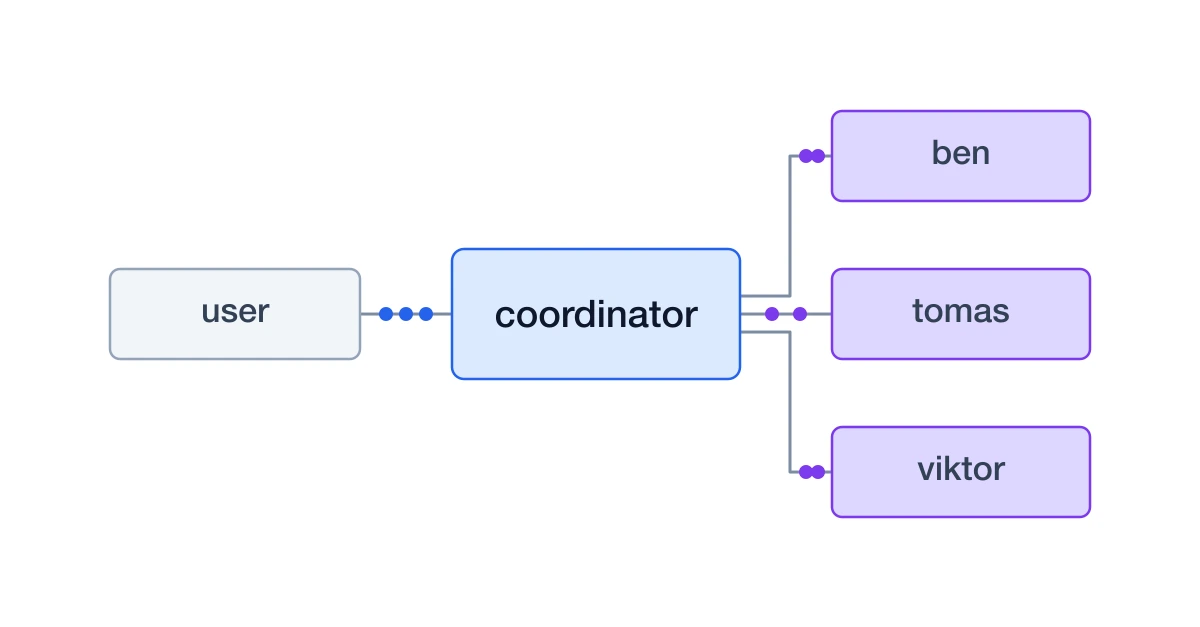
An asynchronous team is only as good as your ability to see what it did. One topic produces four conversations and ten trace events, and both views say something the other does not.
Throughout this series we build one team: Iris Vale, a coordinator, and three panelists who never speak to each other — Tomas the founder, Ben the on-call engineer, and Viktor the head of operations. You bring a topic; the panel gives you a verdict each. The full source is public: agent-to-agent-example.
What the user sees
Open a chat with the coordinator and send it a topic. You get one line back — Polling 3 profiles. — and seconds later, a single report: a table with each specialist's verdict and score in their own words, where they agree, where they split, the biggest concerns raised, and what would change each of their minds.
Send it something that is not a topic, like "hey", and it asks what you want the panel to react to without opening anything. Polling three people on a greeting wastes their time.
| Thread | Participants | Status | Messages | Created | Updated |
|---|---|---|---|---|---|
| 55064014-a7df-4987…55064014-a7df-4987-a077-d50d01dc6f0f | @viktor#2172a00a, @coordinator#c0f93844 | Active | 2 | Aug 19, 2026, 5:47 AM | Aug 19, 2026, 5:48 AM |
| 4633e0cc-12b1-42a5…4633e0cc-12b1-42a5-bc62-d71c7993559e | @coordinator#c0f93844, @tomas#3ba6b058 | Active | 2 | Aug 19, 2026, 5:47 AM | Aug 19, 2026, 5:48 AM |
| 8511bef7-2370-49e3…8511bef7-2370-49e3-97cf-bdd5ee7bbacb | @coordinator#c0f93844, @ben#40bf3366 | Active | 2 | Aug 19, 2026, 5:47 AM | Aug 19, 2026, 5:47 AM |
| d3a722c6-84ca-480c…d3a722c6-84ca-480c-8e9c-83375beae040 | @coordinator#c0f93844, @user | Active | 3 | Aug 19, 2026, 5:47 AM | Aug 19, 2026, 5:48 AM |
The thread list shows what happened underneath. The bottom conversation is yours. The three above it were opened by the coordinator, named from the reference it chose, each containing exactly two messages: the topic, and the answer.
What the traces show
- Message • Source8/19/2026, 5:47:26 AM
- LLM Call8/19/2026, 5:47:41 AM • 6.40 s
- exec_command8/19/2026, 5:47:44 AM • 3.20 s
- Message • Source8/19/2026, 5:47:59 AM
- LLM Call8/19/2026, 5:48:01 AM
- Message • Source8/19/2026, 5:48:01 AM
- LLM Call8/19/2026, 5:48:03 AM
- Message • Source8/19/2026, 5:48:03 AM
- LLM Call8/19/2026, 5:48:10 AM • 1.63 s
- exec_command8/19/2026, 5:48:10 AM • 118 ms
| Field | Value |
|---|---|
| Provider | openai |
| Model | 60319f6e-e34a-4fbd-b712-9bbc73fe2b26 |
| Reasoning | 139 tokens |
| Invoked tools | exec_command |
thread: d3a722c6-84ca-480c-8e9c-83375beae040from: @userShould we move from per-seat pricing to usage-based billing?Open the coordinator in the tracing app and count the message events: four. The user's
topic, and three replies. That count is the asynchronous model made visible — four
separate wakes, each its own unit of work, rather than one long call with three blocking
sub-calls hidden inside it. Around them sit the LLM calls each wake made and the
exec_command calls that sent the messages: 44 seconds of run, most of it the panel
thinking rather than the coordinator waiting.
Open any LLM call and you can read exactly what the model saw. The first one here is the
message tagging from part two, arriving as the model
receives it — thread: and from: @user above the topic itself.
Each run's timeline lists every event in order — messages, LLM calls, tool executions, and context summarizations — with status, duration, and a token breakdown split into input, cached input, output, and reasoning. You can open any LLM call and read the exact prompt the model saw, watch a long-running tool's output stream in, follow a live run, and terminate one that has gone wrong.
That makes the three common failure modes straightforward to diagnose:
- The report never arrives. The coordinator woke on the last reply but did not conclude the panel was complete. Open its final run and read the LLM context to see what it was working from.
- One specialist stays silent. Its sub-thread has no answer. Look at that instance's run for a failed turn or a model error.
- Something happened twice. At-least-once delivery: a workload crashed before acknowledging its inbox and received the same message again on restart.
One caveat — traces store the full LLM request context, so they are large and expire sooner than the conversations themselves. Debug from traces while they are fresh.
Taking it further
The panel is a deliberately simple shape for a multi-agent system: one coordinator, three specialists that only answer. Everything harder is a variation on the same two settings. A specialist that needs to consult someone else becomes a coordinator for its own sub-conversation. An agent that reports to a Slack channel instead of a user is the same agent with a different participant. A specialist that needs its own credentials gets its own environment rather than sharing one.
What stays constant is the messaging model: an inbox per agent, one turn per wake, and no
agent ever blocked on another. Clone
agyn-sandbox/agent-to-agent-example,
apply deployments/agent-to-agent, and change one persona file to make the panel yours.
Newsletter
Get new agent engineering posts in your inbox
Occasional practical notes on secure agent runtimes, orchestration, and AI engineering.